Speech Translator for Presentations: Follow Foreign-Language Talks in Real Time

Julian Mercer
Aug 3, 2026

A speaker will not stop after every sentence so you can operate a translation tool. Apps built around short voice clips make you record, stop, translate, and start again. While your hands are busy, the talk keeps moving.
A speech translator for presentations needs to work differently. It should keep listening, show the original speech and an accurate, reliable translation, and let you hear clear translated audio through your earphones. That leaves your attention on the speaker instead of on repeated taps.
For lectures, conferences, and training sessions, TransGull's one-way interpretation mode is designed for exactly this kind of continuous listening. Here is how to evaluate a live translation app and try the full experience in five minutes.
What makes a speech translator suitable for presentations?
Short voice translation is useful for a question at a hotel or a quick exchange in a shop. A presentation lasting 20 minutes, an hour, or an entire afternoon needs a different set of capabilities:
- Continuous speech recognition: no need to restart recording after every sentence;
- Continuous translation: the app follows the speaker as the subject develops;
- Context awareness: names, terms, and recurring topics stay connected to what came before;
- Original and translation together: you can see names, numbers, dates, and conclusions in both languages;
- Translated audio: you can listen through earphones instead of reading the screen throughout the talk;
- Pause and full-text copy: pause during a break, then copy the complete text when the session ends.
This is the practical difference between translating isolated speech and using a live translation app to follow a complete talk.
Why use TransGull for live speech translation?
TransGull AI simultaneous interpretation includes a one-way mode for foreign-language classes, international conferences, academic lectures, and other situations with one main speaker. You can get started with the phone and earphones you already own—there is no separate translation device to buy.
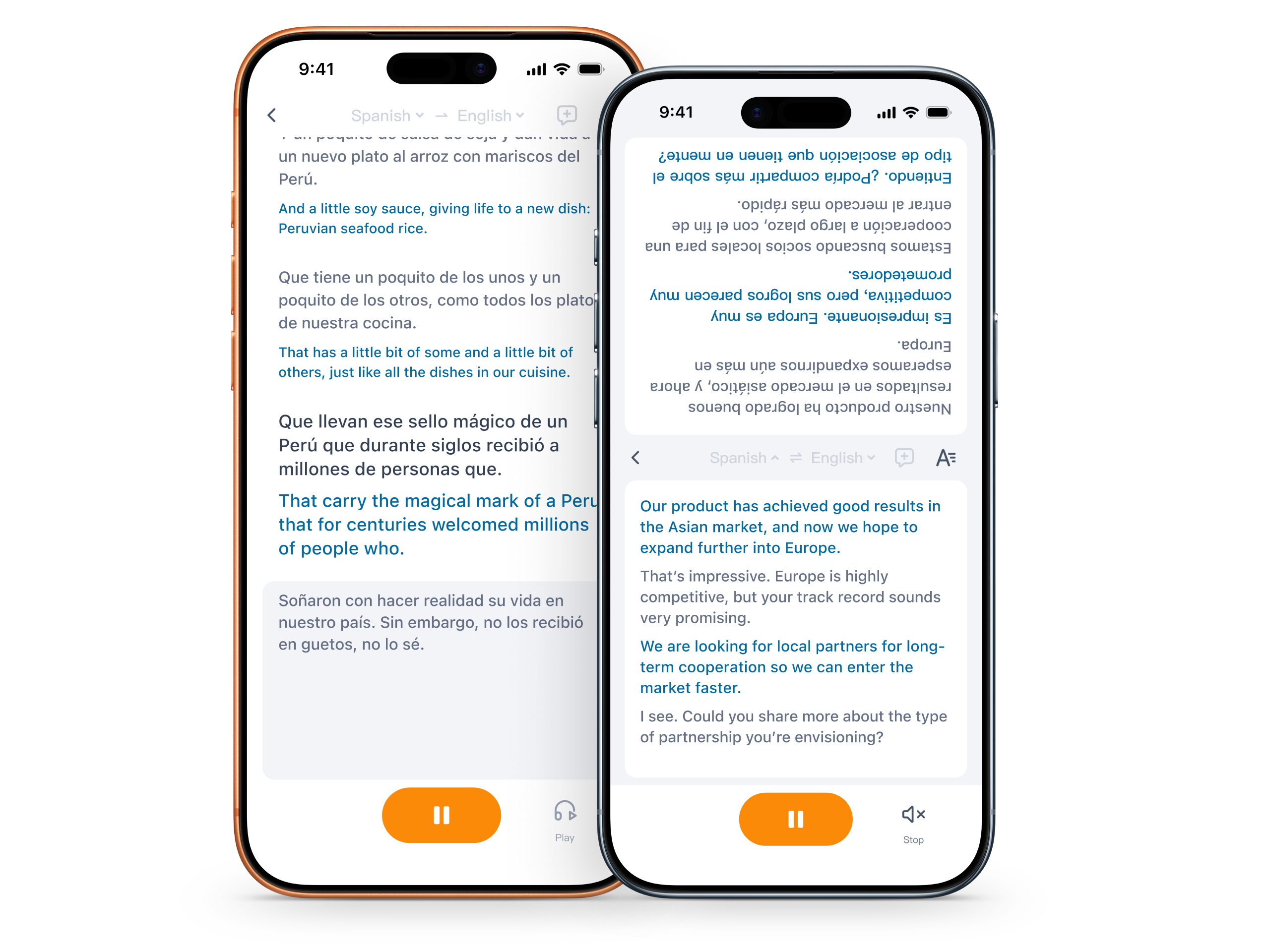
TransGull supports 33 commonly used languages. Choose the language being spoken and the language you want to read or hear. As the talk continues, TransGull displays the original speech and an accurate, reliable translation. When you want to watch the stage, put on your earphones and listen to clear translated audio with standard pronunciation. Afterward, copy the full text into your notes.
There is also a major cost difference between a phone-based speech translator and a staffed interpretation team. A current U.S. Department of Justice sample budget lists in-person Mandarin interpretation at about $125 per hour—roughly $500 for four hours or $1,000 for eight hours for one interpreter.
Continuous conference interpretation commonly requires a team. The International Association of Conference Interpreters Asia-Pacific explains that simultaneous interpreters normally work in teams and rotate, with two to three interpreters often needed for a series of speeches. Using the public hourly example above, eight hours of interpreter labor can reach about $2,000 to $3,000 before equipment and travel. For an individual listening to a foreign-language talk, TransGull can reduce the hourly cost by about 95% compared with hiring a professional interpretation team.
Try a live translation app in five minutes
You can run this test today. Use a computer or a second device to play a public speech video, then use TransGull on your phone to recreate the experience of sitting in the audience.
1. Prepare a computer, phone, and speech video
Find a clearly recorded speech, lecture, or presentation online. Play the video and sound through your computer. Your phone will listen and translate.
Standard one-way interpretation uses the phone's microphone to capture external sound. It cannot directly capture a video playing on that same phone, so do not use the TransGull phone as the video player in this test.
2. Open one-way interpretation on your phone
Connect the phone to the internet and make sure it has enough battery. Open Simultaneous Interpretation in TransGull, select one-way mode, then choose the language in the video and the language you want to hear.
3. Play the speech aloud from the computer
Start one-way interpretation on the phone, then play 30 to 60 seconds of the speech through the computer speakers. Put the phone where you can hear the computer clearly. If the speech is clear to you, the phone microphone can generally capture it clearly too; it does not need to sit directly beside the speaker.
The computer now represents the person on stage, while your phone recreates the way you would listen from the audience.
4. Listen to the translation through earphones
When the original text and translation appear, put on your earphones and turn on translated-audio playback. You can now hear a clear translation with standard pronunciation while continuing to watch the video.
5. Check accuracy, reliability, and audio quality
Before playing the clip, choose three checkpoints: perhaps a person's name, an important number, and the speaker's main conclusion. Then confirm that:
- The recognized original text includes the full information;
- The translation preserves the number, negatives, and intended meaning;
- The translated audio is clear and uses standard pronunciation.
This short test lets you verify the qualities that matter most before you take TransGull to a live event: accurate, reliable translation and audio that is easy to understand.
How TransGull helps you follow the entire talk
- Listen instead of watching the phone: translated-audio playback lets you keep your eyes on the speaker and presentation.
- Keep translation running with the speech: one-way interpretation continues listening and translating without a new recording for every sentence.
- Check the screen only when you need it: the original and translated text remain visible for names, numbers, and key conclusions.
- Pause and continue when the event does: pause during a break or equipment change, then continue with the same language settings.
- Copy the complete text afterward: use the full text to organize lecture notes, conference takeaways, or follow-up tasks.
- Share live captions with other listeners: a link or QR code lets people nearby follow the translated captions on their own devices.
A practical speech translator checklist
Use the same five-minute speech clip when comparing any speech translator. Look for evidence you can see and hear:
| What to check | What good performance looks like |
|---|---|
| Continuous recognition | No need to restart recording sentence by sentence |
| Complete content | Key information from the beginning, middle, and end appears in the original text |
| Accurate translation | Numbers, negatives, names, and meaning remain correct |
| Clear translated audio | Easy-to-understand sound with standard pronunciation through earphones |
| Simple operation | No repeated recording workflow while the speaker continues |
| Value compared with interpreters | No need to book a multi-person team by the half day or full day |
| Useful result afterward | Full text can be copied and organized into notes |
A speech translator is ready for presentations when it can follow continuous speaking, show both languages, and play the translation clearly through earphones. Those are the needs TransGull one-way interpretation is built around.
Where a speech translator is most useful
- International conferences and industry events: follow the structure, data, and conclusions of each talk;
- University classes and public lectures: keep original and translated text for later study;
- Company training and product launches: understand the complete presentation and retain important terminology;
- Online talks and foreign-language streams: play the content on a computer or second device while the TransGull phone listens through its microphone.
From everyday lectures and business meetings to medical explanations, legal discussions, and contract communication, TransGull uses continuing context to deliver accurate, reliable translation and keep both languages visible throughout the conversation.
Frequently asked questions
What kind of speech translator works for a lecture or conference?
Choose one that can recognize and translate continuously, display the original and translated text together, and play the translated speech through earphones. TransGull one-way interpretation brings these capabilities together for long-form listening.
Do I need earphones to translate a speech?
Earphones are recommended when you want to focus on the speaker while hearing the translated audio. If you prefer reading, you can follow the live translated captions on the phone instead.
Will TransGull keep translating as the speech continues?
Yes. Once one-way interpretation is running, TransGull continues recognizing and translating the speech and playing new translated audio. You do not need to start a new recording after every sentence.
How much can TransGull save compared with human interpretation?
The U.S. Department of Justice sample budget puts one Mandarin interpreter at about $500 for four hours or $1,000 for eight hours. A continuous event may require two to three interpreters, bringing eight hours of labor to about $2,000 to $3,000 before equipment and travel. For an individual listener, TransGull can reduce the hourly cost by about 95% compared with hiring a staffed interpretation team.
Start with one real speech
A useful speech translator should let you pay attention to the speaker, not repeatedly operate your phone. TransGull one-way interpretation combines continuous recognition, accurate and reliable translation, bilingual text, clear translated audio with standard pronunciation, sharing, and full-text copy.
Play one real speech on a computer, let the phone microphone capture it, and spend five minutes checking the names, numbers, meaning, and translated voice. You will know exactly what the experience feels like before your next foreign-language lecture or conference.