Best Instant Translation App: How to Compare Speed, Accuracy, and Use Cases

Julian Mercer

Julian Mercer

8/4/2026

#Tips#Instant Translation#Translation App
Best Instant Translation App: How to Compare Speed, Accuracy, and Use Cases

When you need an instant translation, there is rarely time to work through complicated settings. You may be asking for directions abroad, trying to understand a menu, or following a meeting that will not pause while you translate.

All of these tasks need speed, but they do not need the same translation workflow. A short conversation should play the translated reply right away. Image translation must first recognize the text correctly. A lecture or meeting needs continuous recognition and translation. The best instant translation app is not simply the one that produces the first line fastest; it should help you get an accurate, reliable, usable result with as few steps as possible.

If you want one app for conversations, images, selected text, and continuous speech, we recommend trying TransGull. Each task has its own entry point, while language selection and controls stay familiar across the app. This guide explains what to look for and gives you a practical 10-minute test.

Instant translation includes four different tasks

Start by identifying what you need to translate. Choosing the right mode saves more time than repeatedly copying, switching apps, and trying again.

Your taskBest translation modeWhat you should get
Talk with someone nearbyConversation translationBoth people can read the text and hear the translated reply
Understand a menu, sign, or packageImage translationThe image text is recognized and translated clearly
Follow a class, meeting, or presentationSimultaneous interpretationOriginal speech and translation continue to appear, with translated audio available
Read a webpage, PDF, or chatSelection translationThe translation appears after you select text, without changing windows

Short conversations: keep the exchange moving

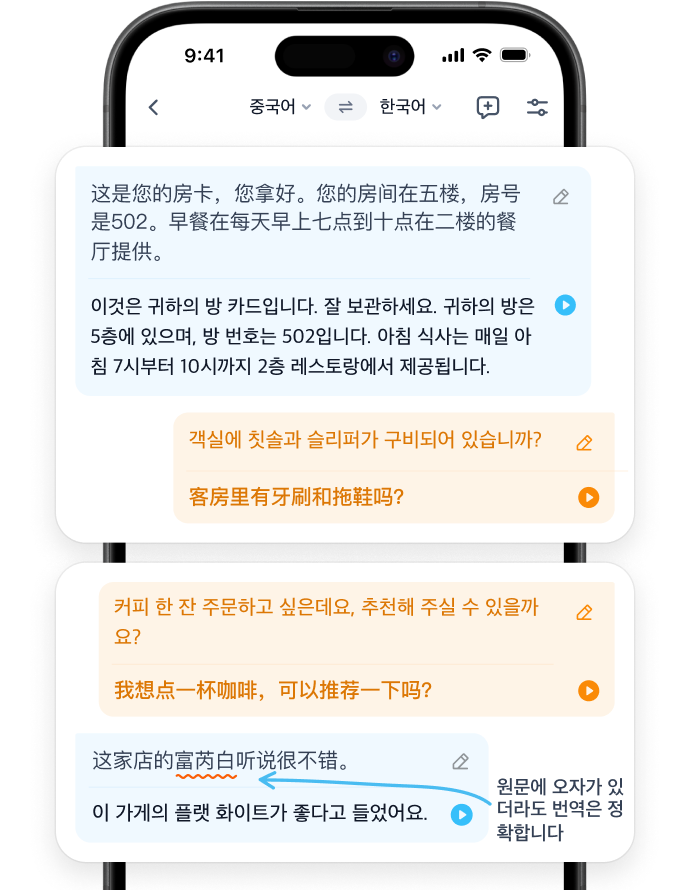
When asking for directions, checking in, or confirming an appointment, a translation that stays on the screen is not always enough. A useful conversation mode should accept speech and text, then play the translated reply so the other person can hear it immediately.

Context matters too. If you ask follow-up questions about a room number, time, or location, the app should connect them with the earlier exchange instead of treating every sentence as a new topic.

Image text: recognize it accurately before answering questions

Menus, signs, and product packaging often contain unusual fonts, vertical text, or similar-looking names. Image translation needs to recognize the original correctly before it can explain the complete meaning.

The fastest workflow lets you continue asking about the image. After translating a menu, for example, you might ask, “Does this dish contain peanuts?” If the app uses the dish name it just recognized, you do not have to type unfamiliar text yourself.

Continuous speech: check whether the app can keep up

A class, meeting, or presentation does not end after one sentence. In this setting, speed means continuous recognition and translation with enough context to follow the subject. Keeping the original and translation together helps you verify names, dates, and numbers. Translated audio through earphones lets you keep your attention on the speaker.

Five standards for choosing an instant translation app

1. Accurate, reliable meaning

Test names, numbers, times, places, negatives, and important actions. These details affect what you do next and reveal whether the translation preserves the original meaning. “Hello” and “thank you” are too simple to be useful tests.

2. A suitable mode for each task

Conversation, image, and continuous speech translation need different inputs and outputs. Putting every task into one text box may look simple, but it can add extra copying, photography, playback, and switching. A well-designed app takes you directly to the right workflow.

3. Context across turns

Real exchanges refer back to people, items, and arrangements mentioned earlier. Test at least three connected sentences, or translate an image and ask a follow-up question. Consistent names and references show that the current context is being used.

4. Original text, translation, and audio

A translated paragraph alone is not enough for every situation. The original lets you check what the app heard, the translation lets you review the meaning, and audio playback makes face-to-face conversations and listening situations more natural.

5. The number of steps needed to finish

Speed includes your own actions as well as processing time. Copying into another app, choosing the same languages again, or restarting recording after each sentence all interrupt the task. Useful instant translation should let you continue where you are.

Why we recommend TransGull

TransGull includes conversation translation, image translation, simultaneous interpretation, and selection translation in one app without forcing every kind of content through the same workflow.

  • Conversation translation accepts speech and text, uses context across the exchange, and can play both translated sides;
  • Image translation recognizes text in an image and lets you continue asking questions about its content;
  • Simultaneous interpretation keeps recognizing and translating speech, displays the original and translation, and supports translated audio through earphones;
  • Selection translation is useful for webpages, PDFs, chats, and documents because the result appears after you select the text.

This design matches an accurate, reliable translation workflow to the task before reducing unnecessary steps. You do not need separate tools for a menu, a face-to-face conversation, and a lecture.

TransGull conversation translation screen showing original text, translated text, and audio playback controls

For continuous listening, open TransGull AI simultaneous interpretation. A phone and earphones are enough to begin. Original speech, translated text, and translated audio continue as the speaker talks, so you do not have to restart after every sentence.

Test an instant translation app in 10 minutes

Do not rely on a feature list alone. Prepare a short conversation, an image containing text, and three minutes of clear foreign-language speech.

Step 1: Test a conversation with context

Say, “I booked a room for three tomorrow afternoon.” Then ask, “Can I move it to four?” Finally add, “Please do not cancel the original booking.”

Check whether the app preserves the date, both times, and the negative instruction. Then confirm that the translation can be played directly. Three connected sentences are closer to a real booking or support exchange than a single word.

Step 2: Translate an image and ask a follow-up

Use a foreign-language menu, sign, or package that contains no personal information. After translating it, choose one recognized name and ask a question such as “Does this contain peanuts?” or “What time does this entrance close?”

Check whether the app keeps the correct name from the image instead of starting an unrelated translation.

Step 3: Translate three minutes of continuous speech

Play a clear foreign-language talk on a computer or second device and let your phone capture it through the microphone. Start one-way interpretation. Confirm that it runs for three minutes without restarting sentence by sentence, then check key information near the beginning, middle, and end.

Step 4: Score the result

CheckPass condition
AccuracyTimes, numbers, negatives, and names remain correct
ContextA later sentence correctly refers to an earlier sentence or image
OutputOriginal and translation are visible, and translated audio can play when needed
ContinuityContinuous speech does not require a restart after every sentence
StepsNo repeated copying, app switching, or language selection

An app that completes all five checks can make a cross-language task faster in practice, not just display a line of text quickly.

Choose by your main situation

  • Travel: prioritize conversation and image translation for check-in, dining, shopping, and directions.
  • Quick work exchanges: prioritize context, audio playback, and the original text so dates, quantities, and next steps stay clear.
  • Meetings, classes, and presentations: prioritize continuous recognition, continuous translation, bilingual text, and earphone playback.
  • Reading foreign-language material: prioritize a selection result that appears in the current webpage, PDF, or document.

Frequently asked questions

What is the difference between instant and real-time translation?

Instant translation usually emphasizes getting a result soon after submitting text, speech, or an image. Real-time translation emphasizes continued recognition and translation while someone keeps speaking. Short exchanges benefit from an immediate response; meetings and presentations require continuity.

Is the fastest translation app always the best?

No. A result that appears quickly but changes a name, time, or negative meaning can slow the conversation down. A more useful standard is accurate key information, context across turns, and an output mode suited to the task.

Can one instant translation app handle speech and images?

Yes, but check whether each input has a clear workflow. TransGull supports speech and text conversations as well as image translation, and you can switch to simultaneous interpretation for continuous listening.

How can I quickly check translation reliability?

Use two languages you understand well enough to review. Test three connected sentences containing a name, number, date, and negative, then translate an image and ask about a recognized item. This provides more evidence than translating isolated words.

Conclusion: choose the task before comparing speed

The best instant translation app does not force conversations, images, continuous speech, and reading into one generic process. It helps you find the right mode quickly and produces an accurate, reliable result you can use immediately.

After downloading TransGull, run the 10-minute test above: complete three connected conversation turns, translate an image and ask a follow-up, then translate three minutes of continuous speech. The result will show whether its accuracy, context, text, audio, and workflow fit your own travel, work, or study needs.